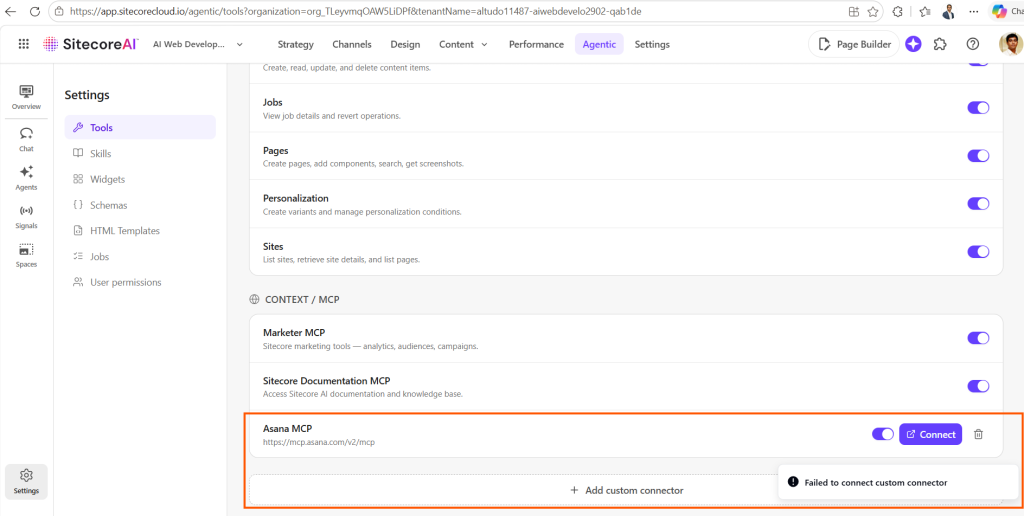
SitecoreAI Agentic Studio: “Failed to connect custom connector” When Adding Custom MCP Connectors? Here’s Why
While exploring custom MCP connectors in SitecoreAI Agentic Studio, I ran into an issue when trying to add a few self-hosted and vendor-provided MCP connectors like Asana, Vercel, etc.
Every attempt resulted in the same error: “Failed to connect custom connector”
At first, this looked like a typical connector configuration issue. I checked the usual suspects: the MCP server URL, authentication setup, browser behavior, possible OAuth redirect issues, and whether the endpoint itself was reachable.
But after raising a Sitecore Support ticket and having the issue investigated, the actual reason turned out to be a current limitation in Agentic Studio’s custom MCP connector authentication handling.
The issue
In Agentic Studio, custom MCP connectors can be added from the Tools -> Context/MCP settings area by providing a connector name and the remote MCP server URL.
However, when I tried adding MCP servers such as Asana, Vercel, and a few self-hosted MCP endpoints, Agentic Studio failed with:
Failed to connect custom connector
What Sitecore Support confirmed
Sitecore Support was able to reproduce the issue both in my environment and on their side using the provided MCP URLs.
After their investigation, they confirmed that the error is caused by a current limitation in Agentic Studio’s authentication handling for custom MCP connectors.
At the time of writing, Sitecore Support confirmed that Agentic Studio custom MCP connectors only support basic authentication scenarios. Providers with stricter OAuth models, such as the MCP URLs tested for Asana and Vercel, are not yet compatible.
Why Asana, Vercel, and similar MCP connectors may fail
Many vendor-provided MCP servers rely on stricter OAuth flows. These flows may involve provider-specific authorization behavior, redirect URI validation, token exchange requirements, scopes, consent screens, and tenant-level security rules.
If Agentic Studio cannot complete that authentication flow, the connection attempt may fail with the generic:
Failed to connect custom connector
So, if you are trying to connect a custom MCP connector for tools like Asana, Vercel, or other OAuth-heavy SaaS platforms, the error may not be caused by your MCP endpoint configuration.
It may simply be that the provider’s OAuth model is not yet supported by Agentic Studio custom connectors.
Feature request reference
Sitecore Support has registered a feature request so it can be considered for future implementation.
The reference number provided is:
AS-912
If you are running into the same issue, this reference may be useful when discussing the limitation with Sitecore Support or your Sitecore account team.
What you can check before raising a ticket
Before assuming it is the same issue, I would still recommend checking the basics:
Confirm the MCP server URL is correct.
Confirm the endpoint is publicly reachable if required.
Test the same MCP server in another MCP-compatible client.
Check whether the provider requires a strict OAuth flow.
Capture browser console errors and failed network requests.